Manual 使い方
○ App screen アプリ画面
- Select what to capture. キャプチャ対象を選択する。
- Clicking [Select] lets you choose the window or screen that contains what you want to capture. [選択]をクリックして、キャプチャ対象を含むウィンドウや画面を選択します。
- Clicking [Stop] deselects the current target. 選択した対象を解除する場合は[停止]ボタンをクリックします。
- Clicking [Select] lets you choose the window or screen that contains what you want to capture. [選択]をクリックして、キャプチャ対象を含むウィンドウや画面を選択します。
- Create capture images.
キャプチャ画像を作成する。- Clicking [Copy Image] copies the target screen to the clipboard as an image. [画像コピー]をクリックすると、キャプチャ対象画面を画像としてクリップボードにコピーします。
- Clicking [One Shot] opens the target screen for image viewing. [ワンショット]をクリックすると、キャプチャ対象の画面をViewerに表示します。
- Clicking [Add screenshot] saves the target screen as an image.
When you click an image in the list, it is displayed in the viewer. [スクショ追加]をクリックすると、キャプチャ対象の画面を画像一覧に残します。
一覧内の画像をクリックすると、その画像をViewerに表示します。 - When [Countdown] is ON, the capture is taken after the specified number of seconds.
When capturing screens that require some operations, use the countdown feature. [カウントダウン]をONにすると、指定秒後にキャプチャし Viewer を表示します。
いくつかの操作が必要な画面をキャプチャする場合は、カウントダウンを使いましょう。 - Clicking [Clear all] removes every captured image. [全て消去]をクリックすると、キャプチャ画像を全て消去します。
- Operate list of screenshots. スクショ一覧を操作する。
- Clicking an image displays the Viewer screen. 画像をクリックすると、Viewer画面を表示します。
- Clicking download downloads the image. downloadをクリックすると、画像をDownloadします。
- Clicking content_copy copies the image. content_copyをクリックすると、画像をコピーします。
- Download captured images. キャプチャ画像をダウンロードする。
- Clicking [Zip] downloads all captures as a Zip file. [Zip]をクリックすると、キャプチャ画像全体をZipファイルにまとめてダウンロードします。
- Clicking [Excel] downloads all captures in an Excel file. [Excel]をクリックすると、キャプチャ画像全体をExcelファイルにまとめてダウンロードします。
○ Viewer screen Viewer画面
- Operation 操作
- Clicking [Copy All] copies the entire image in the editor to the clipboard. [全体コピー]をクリックすると、編集表示内の画像全体をクリップボードにコピーします。
- Clicking [Area Copy] switches to a mode that lets you select an area in the editor and copy it to the clipboard. [範囲コピー]をクリックすると、編集表示内の範囲を選択しクリップボードへコピーするモードに切り替えます。
- [Drag Image] Switch to the mode for dragging images within the editor. [ドラッグ移動]は、編集表示内の画像をドラッグ移動するモードに切り替えます。
- [Scale] is used to resize the image. [倍率]は、画像を指定の倍率で縮尺変更します。
- When [Close After Copy] is on, the Viewer closes after copying to the clipboard. [コピー後に閉じる]をONにすると、クリップボードへコピー後にViewerを閉じます。
○ Config 設定
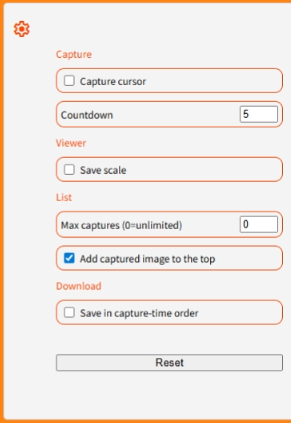
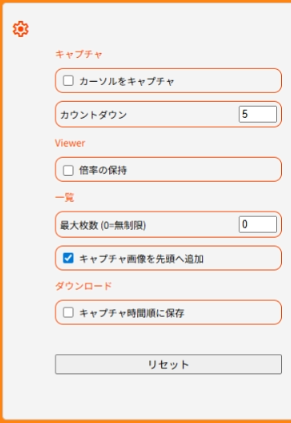
- Capture キャプチャ
- [Capture cursor] [カーソルをキャプチャ]は、キャプチャ対象選択時に、マウスカーソルを含めたキャプチャをするか選択します。
- Countdown is for setting the number of seconds for countdown capture. [カウントダウン]は、カウントダウンキャプチャする秒数を設定します。
- Viewer Viewer
- [Save scale] is for keeping the scale set in the editor and applying it to other images. [倍率の保持]は、編集表示で設定した倍率を保持し、別の画像に対しても適用します。
- List 一覧
- [Max captures] is for setting the maximum number of captures. 0 means no limit. [最大枚数]は、キャプチャする最大数を設定します。0は制限無しです。
- [Add captured image to the top] is on, the captured images are added to the top of the screenshot list. [キャプチャ画像を先頭へ追加]をONにすると、スクショ一覧へ画像を追加する位置を先頭にします。
- List 一覧
- [Save in capture-time order] is on, the images are ordered by capture time when saving. [キャプチャ時間順に保存]をONにすると、Zip/Excel保存時の画像の順番をキャプチャ時間順にします。
- Clicking [Reset] will tore settings to their default state. [リセット] は、設定を初期状態に戻します。
○ Notes / - troubleshooting 注意事項 / トラブルシュート
- When using multiple displays with different resolutions, the captured image may appear at a different scale.
Moving the app to the same display as the capture target before selecting it may improve the result. 解像度の異なるディスプレイを複数使用している場合、キャプチャした画像サイズが見た目の大きさ異なる場合があります。
アプリをキャプチャ対象と同じディスプレイ内に移動してから、対象選択すると改善される可能性があります。 - If the preview screen is hidden, the image may not be captured correctly. プレビュー画面が隠れていると、正しく画像キャプチャできない場合があります。
- When you capture the desktop that contains the Sc.Shot app, the image may appear mirrored.
Please move the Sc.Shot app to another display before capturing. Sc.Shot アプリのあるデスクトップをキャプチャすると、鏡写しのようになります。
Sc.Shot アプリを別のディスプレイに移動してからキャプチャしましょう。 - If the Viewer does not appear, go to “Settings > Pop-ups and redirects” and allow https://app.scshot.xyz. Viewerが表示されない場合は、「設定 > ポップアップとリダイレクト」から、https://app.scshot.xyz を許可してください。